


What Does Optimized Battery Charging Mean? A Complete Guide
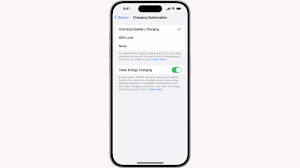
If you’ve ever noticed a setting called optimized battery charging on your smartphone or laptop, you might have wondered what it actually does. Many people assume it simply charges the battery faster, but that’s not true. In reality, optimized battery charging is designed to protect your device’s battery health and extend its lifespan.
In this blog, we’ll break down what optimized battery charging means, how it works, and why it matters for your device.
What Does Optimized Battery Charging Mean?
Optimized battery charging is a smart feature built into modern devices that helps reduce battery aging. Instead of charging your battery to 100% immediately, it learns your daily charging habits and delays charging beyond a certain level (usually 80%) until you actually need it.
This helps prevent your battery from staying at full charge for long periods, which can slowly damage it over time.
Why Battery Health Matters
Most devices today use lithium-ion batteries. While these batteries are efficient, they naturally degrade over time. One of the main causes of this degradation is keeping the battery at 100% charge for extended periods.
Optimized battery charging reduces this stress by:
- Limiting full charge duration
- Reducing heat generation
- Managing charging speed intelligently
This results in a longer-lasting battery and better overall device performance.
How Optimized Battery Charging Works
The feature uses machine learning to understand your daily routine. For example:
- If you usually charge your phone overnight
- If you unplug your device at a specific time every day
Based on this data, your device will:
- Charge quickly up to around 80%
- Pause charging temporarily
- Resume charging to 100% just before you typically unplug it
This ensures your device is ready when you need it without overcharging.
Benefits of Optimized Battery Charging
1. Extends Battery Lifespan
By avoiding constant full charges, your battery stays healthier for a longer time.
2. Reduces Heat Damage
Heat is one of the biggest enemies of battery health. This feature helps minimize overheating during charging.
3. Improves Long-Term Performance
Devices with better battery health tend to perform more efficiently over time.
4. Saves Replacement Costs
A healthier battery means you won’t need to replace it as often, saving money in the long run.
When Should You Use Optimized Battery Charging?
You should keep this feature enabled if:
- You charge your device overnight
- You use your device daily with a predictable routine
- You want to extend battery life
However, if you need your battery to charge to 100% quickly (like before travel), you can temporarily disable it.
Common Misconceptions
“It slows down charging”
Not exactly. It only delays the final 20% to protect your battery.
“It’s unnecessary”
Battery replacement costs and performance drops prove otherwise. It’s a useful long-term feature.
“It works the same on all devices”
Different brands implement optimized battery charging differently, but the core idea remains the same.
Tips to Improve Battery Life Alongside This Feature
To get the most out of optimized battery charging, follow these tips:
- Avoid extreme temperatures
- Don’t let your battery drop to 0% frequently
- Use original chargers
- Keep your device software updated
Conclusion
So, what does optimized battery charging mean? It’s a smart and practical feature designed to protect your battery and extend its life. Instead of focusing on fast charging, it focuses on healthy charging.
Keeping this feature enabled is one of the easiest ways to maintain your device’s battery performance over time. If you care about long-term efficiency and saving money on repairs, optimized battery charging is definitely worth using.


 English
 Arabic
 Français
 Español
 Português
 Deutsch
 Türkçe
 Dutch
Dutch
 Italiano
 Russian
 Romaian
 Greek
Greek