


GST Invoice India Format: Generate E Invoice
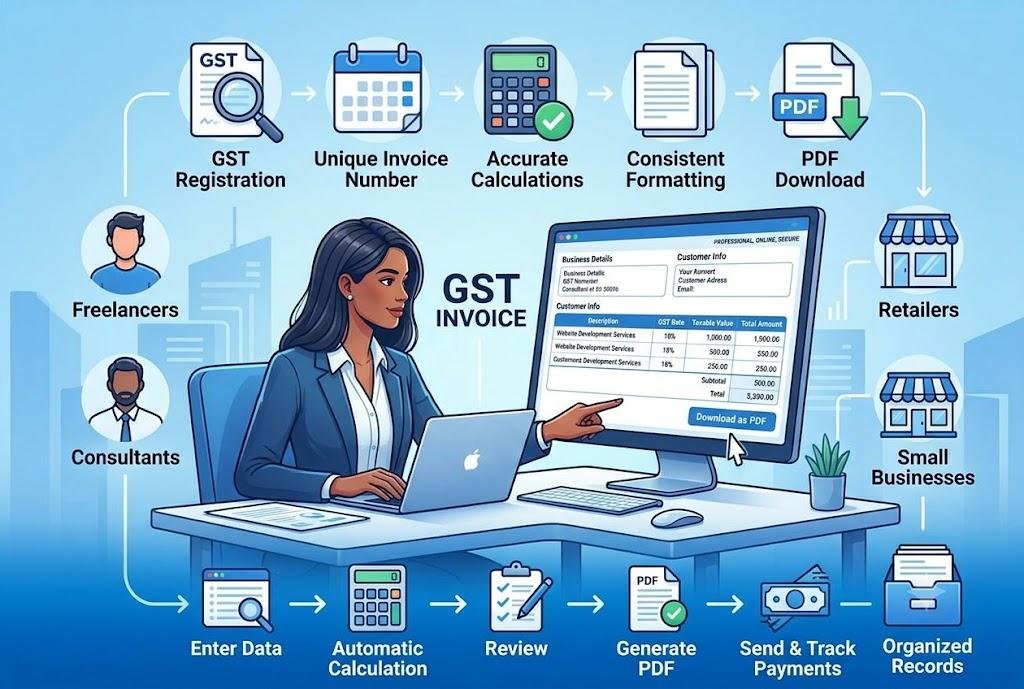
What should a GST invoice in India include?
A GST invoice in India should clearly identify the supplier and customer, describe the goods or services supplied, show the taxable value, and provide a complete GST calculation. Businesses using a gst invoice india format should also include a unique invoice number, place of supply, applicable tax rates, payment terms, and the final amount payable.
A properly structured invoice helps both the seller and customer understand the transaction. It also supports bookkeeping, payment processing, tax reporting, and reliable business record management.
The exact details required may vary depending on the type of supply, customer registration status, transaction value, and applicable tax rules. However, a standard GST invoice generally includes:
- Supplier’s legal business name
- Registered business address
- GST identification number
- Customer’s name and billing address
- Customer’s GST number, where applicable
- Unique invoice number
- Invoice issue date
- Payment due date
- Place of supply
- Product or service descriptions
- HSN or SAC codes, where required
- Quantity, hours, or units
- Unit price or service rate
- Taxable value
- Applicable GST percentage
- CGST, SGST, or IGST amount
- Discounts and additional charges
- Total invoice value
- Payment instructions
Each section should be labelled clearly. Customers should be able to identify the amount due, payment deadline, and tax calculation without searching through the entire document.
Descriptions should also be specific. Instead of writing “services provided,” mention the actual work completed.
Examples include:
- Website development services for July
- Monthly digital marketing management
- Electrical installation and repair
- Business consulting session
- Product supply and delivery
- Annual software maintenance
Clear descriptions improve transparency and reduce customer questions.
How are GST taxes shown on an invoice?
GST is shown by applying the relevant tax rate to the taxable value of the goods or services. For transactions within the same state, GST is generally divided into CGST and SGST. For transactions between different states, IGST may apply instead.
Consider this basic example:
- Taxable value: ₹50,000
- GST rate: 18%
- Total GST: ₹9,000
- Final amount: ₹59,000
For an intrastate transaction, the tax may appear as:
- CGST at 9%: ₹4,500
- SGST at 9%: ₹4,500
- Total invoice value: ₹59,000
For an interstate transaction, the tax may appear as:
- IGST at 18%: ₹9,000
- Total invoice value: ₹59,000
The invoice should show the taxable subtotal, tax rate, tax amount, discounts, additional charges, and final amount separately.
Businesses should confirm the correct tax rate for each product or service. GST rates may vary depending on the nature of the supply, classification, place of supply, and applicable regulations.
The wrong GST rate can affect the final amount and may require the invoice to be corrected.
Automatic calculation tools can reduce repetitive work, but users must still review the figures entered. If the price, quantity, discount, or tax percentage is incorrect, the final calculation will also be wrong.
How can a business generate an electronic invoice?
A business can create an electronic invoice by entering the supplier, customer, transaction, tax, and payment details into a compatible digital system. To generate e invoice correctly, the user should verify the invoice information, apply the appropriate GST treatment, and follow any current reporting or validation requirements relevant to the transaction.
Electronic invoicing is different from simply creating a document on a computer. In certain situations, an invoice may need to be submitted through an authorised system for validation before it is treated as a valid electronic invoice.
A general process may include:
- Create the invoice in the billing or accounting system.
- Add complete supplier and customer details.
- Enter the GST identification numbers.
- Add product or service information.
- Include HSN or SAC codes where required.
- Confirm quantities, prices, and taxable values.
- Apply the correct GST rates.
- Review the place of supply.
- Submit the required invoice data through the applicable system.
- Receive the relevant acknowledgement or reference.
- Add validated details to the final invoice.
- Save and share the completed document.
The exact process may depend on the current rules, business turnover, transaction type, and software being used.
Businesses should confirm whether they are required to follow a formal e-invoicing process. Not every digital PDF automatically qualifies as an electronic invoice under regulatory systems.
Why is electronic invoicing useful for businesses?
Electronic invoicing is useful because it creates a more structured billing process, reduces repeated data entry, and helps businesses maintain consistent transaction records. It may also improve accuracy when invoice details are transferred between billing, accounting, tax, and customer systems.
The main benefits include:
- Faster invoice preparation
- Consistent invoice formatting
- Fewer manual data-entry mistakes
- Better tax record organisation
- Easier access to previous invoices
- Clearer customer communication
- Improved transaction tracking
- Reduced paper-based administration
- Faster document sharing
- More reliable invoice references
Electronic invoicing can also reduce errors caused by copying old documents. Reusing an earlier invoice manually may leave behind:
- The wrong customer name
- An old billing address
- A duplicate invoice number
- Incorrect bank details
- Outdated tax information
- Previous product descriptions
- The wrong payment deadline
A structured digital system keeps the main fields in a consistent location and encourages users to complete all required information.
However, technology does not remove the need for human review. Every invoice should be checked before it is issued or submitted.
Who may need to use e-invoicing?
E-invoicing may apply to registered businesses that meet specific eligibility conditions under current tax rules. Suitability or legal requirements can depend on turnover thresholds, transaction types, customer registration, industry, and regulatory updates.
Businesses that may commonly use electronic invoicing include:
- Manufacturers
- Wholesalers
- Distributors
- Registered service providers
- Technology companies
- Consulting firms
- Marketing agencies
- Construction companies
- Logistics providers
- Larger retailers
Smaller businesses may still use digital invoicing tools even when formal electronic reporting is not required. Online systems can help them create professional invoices, calculate taxes, download PDFs, and organise records.
Businesses should not assume that requirements remain unchanged. Tax rules and eligibility thresholds may be updated, so the latest official guidance should be reviewed when determining whether formal e-invoicing applies.
Professional advice may also be useful when transactions involve complex tax treatment, multiple locations, exports, credit notes, or high invoice volumes.
What makes a GST invoice professional?
A professional GST invoice is accurate, complete, easy to scan, and visually consistent. It should prioritise transaction details over decorative elements and help the customer understand the charges immediately.
The top section should clearly display:
- Business name
- Registered address
- Contact details
- GST identification number
- Business logo, if available
The customer section should show the correct legal or billing information. This may include the customer’s GST number and delivery address where applicable.
Every invoice must also have a unique number. A consistent numbering format may look like:
- INV-2026-001
- GST-2026-048
- CLIENT-0105
- JUL-2026-026
The exact system can vary, but businesses should not reuse the same number.
The itemised section should list products or services separately. Useful columns may include:
- Description
- HSN or SAC code
- Quantity
- Unit rate
- Taxable value
- GST rate
- Tax amount
- Line total
The final amount should be clearly visible. Payment terms and accepted methods should appear near the total so customers know exactly how to complete the payment.
How can businesses avoid GST invoice errors?
Businesses can avoid GST invoice errors by following a consistent creation and review process. Before issuing the document, they should verify all registration details, customer information, tax rates, calculations, invoice numbers, and payment instructions.
Common errors include:
- Incorrect GST identification number
- Missing customer registration information
- Duplicate invoice number
- Wrong invoice date
- Missing place of supply
- Incorrect HSN or SAC code
- Wrong GST percentage
- Incorrect CGST, SGST, or IGST treatment
- Unclear item descriptions
- Missing payment deadline
-
Incorrect bank information
-
Wrong final total
Use this final checklist:
- Confirm the supplier’s legal details.
- Check the customer’s name and address.
- Verify both GST numbers where applicable.
- Use a unique invoice reference.
- Confirm the invoice and due dates.
- Review the place of supply.
- Check all item descriptions.
- Verify quantities and rates.
- Confirm the tax treatment.
- Review every calculation.
- Add clear payment instructions.
- Remove sample information.
- Save a final business copy.
PDF is generally useful for sharing a completed invoice because it preserves the layout and is easy to email, print, and store.
Businesses should organise invoice files by customer, month, financial year, payment status, or reference number. Consistent record keeping makes payment follow-ups, accounting checks, and transaction reviews easier.
Frequently Asked Questions
Is every digital invoice considered an e-invoice?
No. A digital invoice may simply be a PDF or electronic document, while a formal e-invoice may require structured data, submission, validation, and a recognised reference under applicable rules.
Can small businesses create GST invoices online?
Yes. Small businesses can use online tools to enter customer details, calculate taxes, itemise charges, add payment terms, and download professional invoices.
Should GST invoices be saved as PDFs?
Yes. PDF format preserves the document layout and makes completed invoices easier to share, print, download, and store for future reference.


 Arabic
 Français
 Español
 Português
 Deutsch
 Türkçe
 Dutch
Dutch
 Italiano
 Russian
 Romaian
 Portuguese (Brazil)
 Greek
Greek