


Resolving NSF to MBOX Conversion Problems with WholeClear A Troubleshooting Guide
Many times, the migration of mailbox archives between enterprise email systems suffers from unforeseen operational bottlenecks. If you are considering migrating from IBM/HCL Lotus Notes to a cross-platform email application like Mozilla Thunderbird, Apple Mail, or Eudora, you will need to convert from the proprietary NSF (Notes Storage Facility) file structure to the common MBOX (Mailbox Container) format.
However, users and IT admins are often faced with problems such as frozen applications, missing inline attachments, broken folder hierarchies, or failures during the conversion process. In this troubleshooting guide, we will talk about the structural differences between NSF and MBOX formats, the reasons for conversion failure, and the ways to resolve these issues with the help of WholeClear NSF to MBOX Converter.
File Formats – Understanding NSF and MBOX
To understand why the migration is complicated, you must understand how the database objects and metadata are stored in both formats:
-
NSF (Notes Storage Facility): NSF is the proprietary binary database format used by HCL/IBM Lotus Notes and Domino Servers. An NSF file is not a simple email container, but an integrated relational database, with messages, design schemas, access control lists (ACLs), encrypted fields, rich-text objects, and embedded attachment streams.
-
MBOX (Mailbox File): Simple linear text-based file format used by open-source and desktop mail clients like Thunderbird, Apple Mail, and The Bat. It concatenates all messages in a folder into one long file with a standard From delimiter header between each entry.
NSF has proprietary API calls and database schemas. MBOX uses standard RFC 822 text streams. This makes it virtually impossible to extract manually without automated tools.
Why move NSF to MBOX
The major reasons for organizations and individual users to perform an NSF-to-MBOX migration are:
-
Legacy Systems Decommissioning: IBM/HCL Lotus Notes is complex to manage, and licensing fees are still there. Teams can retire expensive Lotus Notes infrastructure by moving database archives to MBOX.
-
Multi-platform and multi-OS support: Lotus Notes databases used to be tied to one desktop environment. MBOX files are supported by macOS (Apple Mail), Linux (KMail), and Windows (Thunderbird).
-
Streamlined Data Management: Common MBOX archiving formats make it easier to search, perform eDiscovery, and store individual mailboxes over the long term.
Common Issues & Reasons during NSF to MBOX Conversion
Usually, the reasons below are the ones due to which the NSF to MBOX conversion process hangs, crashes, or produces corrupted outputs:
-
Missing Lotus Notes Environment: Local API DLLs needed to decode stored objects in NSF database files. Lotus Notes environment is missing. When converting NSF files without an installed and active Lotus Notes client on the system, conversion tools will throw fatal missing-dependency errors.
-
Corrupted Source NSF Archives: Source NSF files can get corrupted due to bad sectors, improper system shutdowns, or inconsistent database indexes. 4. A simple converter may crash or drop data when it hits bad sectors on the database.
-
Large Files & Large Directory Trees: Large NSF files (in the tens of gigabytes) can lead to memory timeouts or truncated directory trees when conversion software is not designed to handle large directory trees.
-
Missing Metadata & Attachments: The complex rich text features of Lotus Notes, including images and other custom attributes like To, CC, BCC, sent/received dates, etc., may not transfer when the parser cannot convert proprietary Lotus Notes features into MIME headers.
Automated Solution: WholeClear NSF to MBOX Converter
Conversion error fixes, achieve total data integrity, bypass file size limitations. What we need is a migration tool. WholeClear NSF to MBOX Converter is a simple and easy tool to export IBM Notes data with no data loss, no metadata loss, and no structure loss.
10 Key Features of WholeClear NSF to MBOX Converter
-
NSF to MBOX Converter: Converts Lotus Notes/IBM Notes NSF files to standard MBOX with cross-platform support.
-
Attachment Conversion: Converts all email messages with attachments.
-
Maintains Folder Structure: It maintains the folder and subfolder structure of the IBM Notes database during conversion.
-
Keeps Email Attributes: Captures important header metadata including To, CC, BCC, Subject, Sent/Received dates, and inline rich-text formatting.
-
Preview Before Conversion: Scans NSF mailbox items and allows a user to interactively preview items before conversion.
-
Multiple Lotus Notes Versions Supported: Supports NSF files created in Lotus Notes/HCL Notes 10, 9.1, 8.5, 7.0, and 6.5 versions.
-
Supports Multiple MBOX Supported Platforms: The exported MBOX files can be easily imported into Mozilla Thunderbird, Apple Mail, Eudora, The Bat, KMail, Netscape, and more.
-
User-Defined Output Location: Users can browse to save the created MBOX file in any local/network drive location.
-
Simple Conversion Process: Wizard for technical and non-technical users.
-
Free Demo Version: Offers a free trial version to check the functionality and convert the first 25 emails of each folder free of cost.
Benefits – Drawbacks of the software
Benefits
-
Easy Interface: The guided wizard takes away the technicalities and helps even beginners to perform the process smoothly.
-
Email data is preserved: Rich text formatting, original folder trees, and embedded attachments are not corrupted.
-
Supports all MBOX clients: Creates standard MBOX files to be used with other desktop mail clients.
-
Preview and Free Evaluation: You can try out the product in full with the integrated preview options and free evaluation before you purchase a license.
Drawbacks
-
Lotus Notes Setup Requirements: The conversion will be done on a computer with Lotus Notes installed and configured.
-
Demo version allows sending only 25 emails: The free trial version is limited to 25 items per folder and requires a licensed upgrade for full enterprise databases.
Conversion procedure
1. Requirements:
Download the program and install You must have IBM /HCL Lotus Notes installed on your Windows Machine.
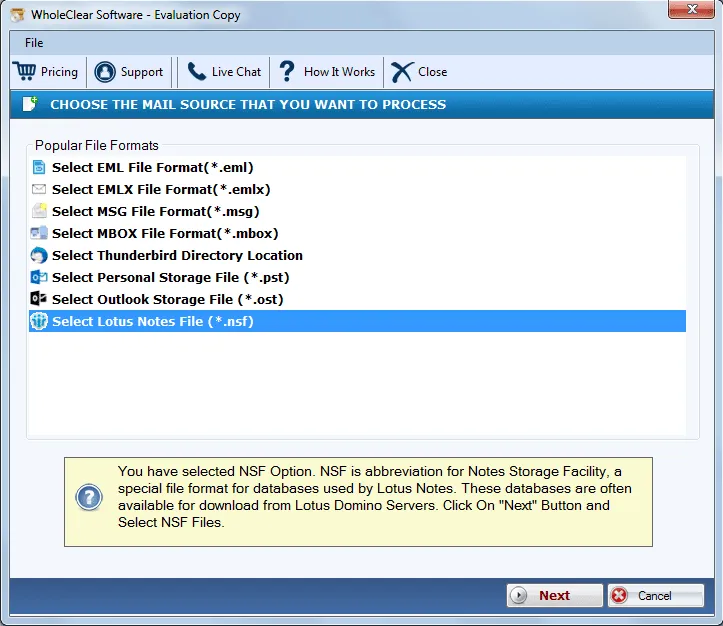
2. Start & Select NSF Data Mode;
Run the software and choose Select.nsf files or Select a folder with multiple Lotus Notes database files.
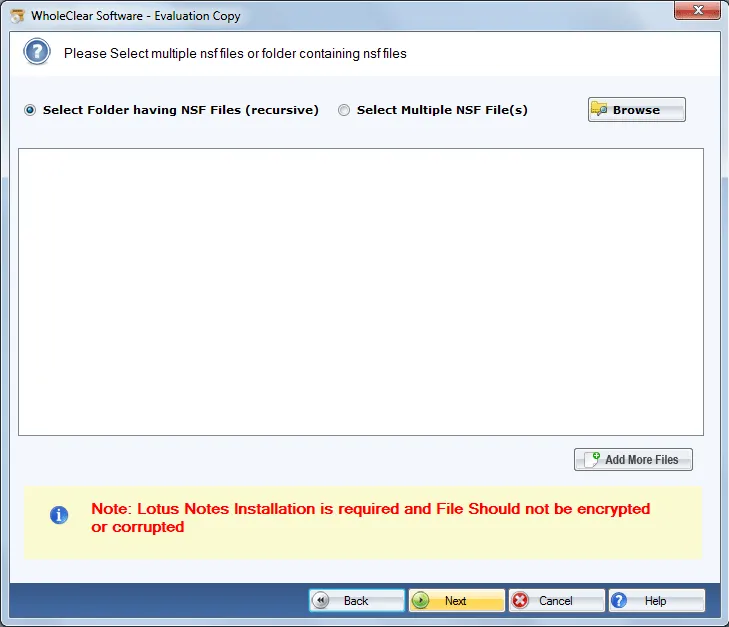
3. Open & Import NSF File Open & Import NSF File
Click Browse and locate the target .nsf database file(s) located on your local drive or network location.
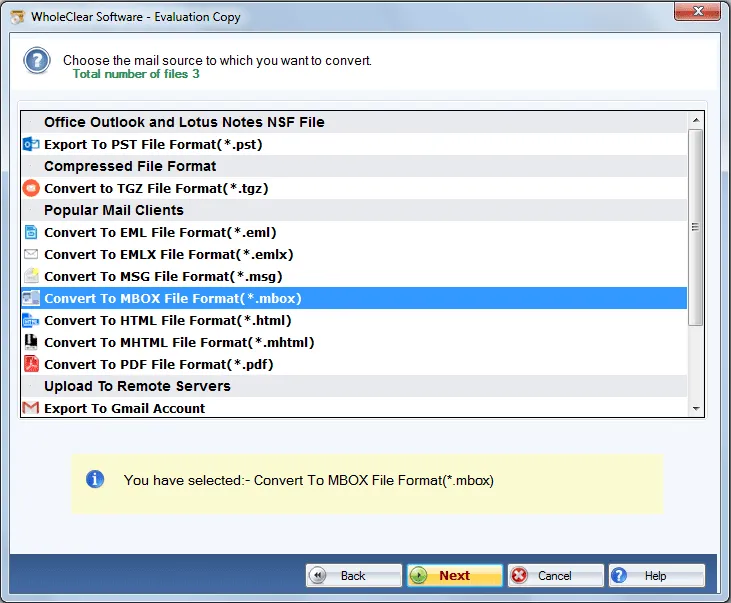
4. Mailbox Items & Folders Overview:
The software automatically scans the loaded database and builds a structured preview panel, with folders, messages, and attributes of the email.
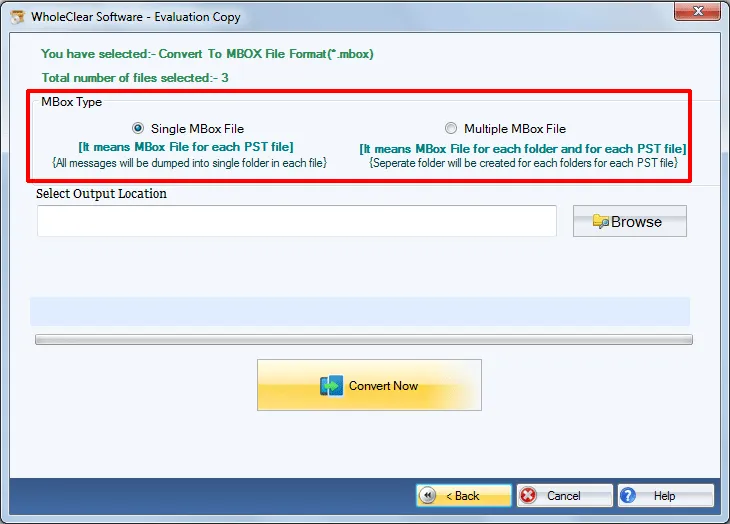
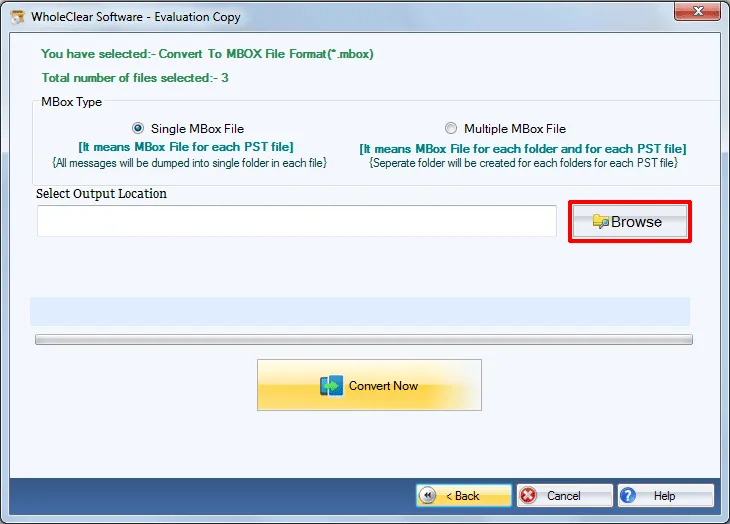
5. Choose Output Location:
Select the application to save converted MBOX files to the local or external drive location.
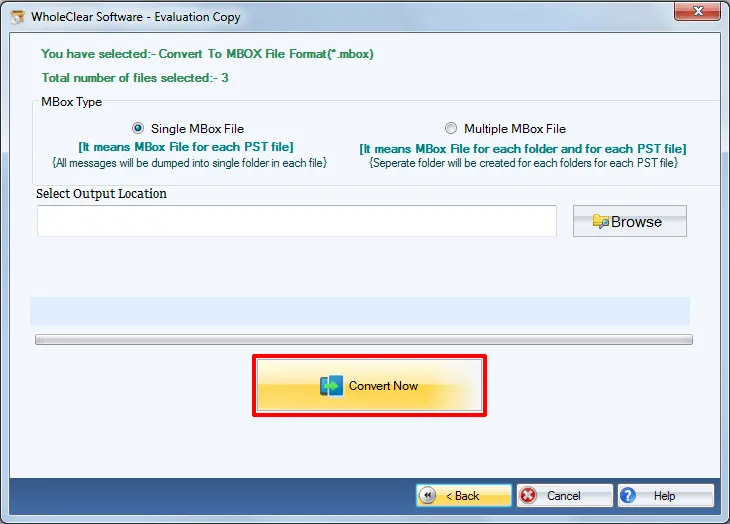
6. Execute NSF to MBOX Converter tool:
Press the Convert Now button to start the migration. Once the progress bar is done, go to the destination folder and get all your MBOX files.
Conclusions
The primary obstacles in Lotus Notes NSF to MBOX conversion are unique database constraints, an inaccessible client environment, or corrupted source files. WholeClear NSF to MBOX Converter is the best tool to resolve all migration failures, keep the integrity of metadata, and migrate mailbox archives quickly.
FAQ’s
1. Software error message when installing Lotus Notes - how to troubleshoot?
WholeClear NSF to MBOX Converter utilizes required Lotus Notes system DLLs to read and extract the encrypted NSF objects safely and securely. The machine that you run the conversion on must have Lotus Notes installed.
2. Is it possible to migrate converted MBOX files to Apple Mail or Mozilla Thunderbird?
Yeah. The resulting MBOX file is RFC-compliant and can be imported to Apple Mail, Thunderbird, Eudora, KMail, The Bat, and other MBOX-compatible clients.
3. Will I lose email attachments while converting NSF to MBOX format?
No. Original Lotus Notes message attachments are converted along with the email body and saved into the resultant MBOX file.
4. What is the limitation of the free demo version?
The trial version allows you to test all conversion features and preview mailbox items, but limits the actual export to 25 emails per folder.


 English
 Arabic
 Français
 Português
 Deutsch
 Türkçe
 Dutch
Dutch
 Italiano
 Russian
 Romaian
 Portuguese (Brazil)
 Greek
Greek