Best Computer Features for Engineering Students
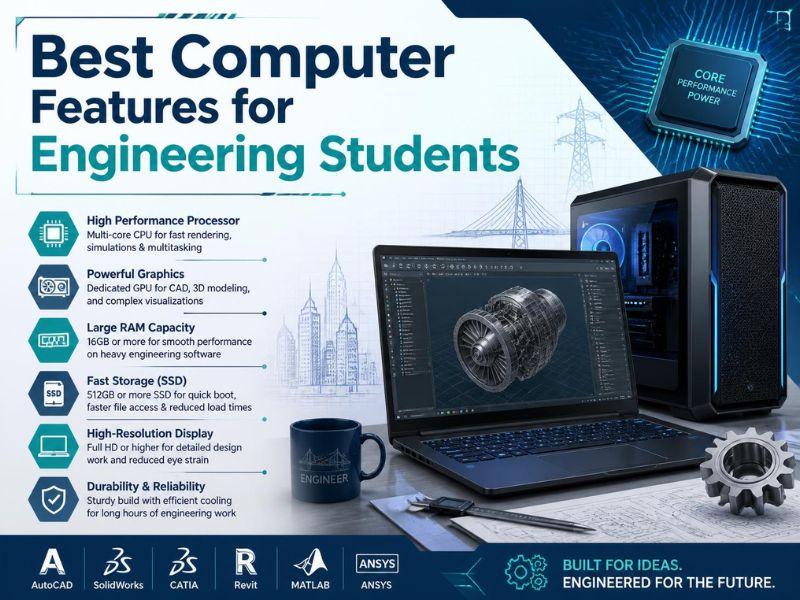
What type of computing power is necessary for an engineering student? A dependable laptop must have good computing power, with a good processor, enough RAM, good storage space, and adequate graphics processing capacity.
Match Computer Power With Engineering Tasks
Apart from taking notes and browsing online, engineering students may find themselves in situations where their computers will have to perform CAD drawing, programming, 3D modeling, simulation, documentation, presentation, and many other technical activities. Thus, what kind of computer power does a engineering student need?
The correct answer is determined by the engineering discipline, software needs, and educational level. A computer that performs efficiently during the initial learning phase can be inefficient at advanced designs or simulations.
The ideal computer is not necessarily the most expensive one. Instead, students should consider an appropriate balance between processor speed, RAM, storage capacity, graphics capabilities, and cooling efficiency.
Recognizing such characteristics can help students prevent themselves from acquiring a system that starts performing poorly when the workload increases.
A Strong Processor Keeps Technical Work Moving
The processor is one of the essential components of an engineering computer. The speed of the processor determines how fast the computer can process various tasks. Engineering students mostly use computer programs that require constant processing power when modeling, performing calculations, compiling code, or working with large files.
When thinking about the computer power does a engineering student need, the processor should correspond to the student's field. An engineering student who uses mostly programming and office applications does not require the same processing power as one who uses complex software like CAD or simulation programs.
The recent multi-core processor offers more room for flexibility. With this processor, a student can process the complex application and, at the same time, have another program open.
More RAM Makes Multitasking Easier
RAM has a direct influence on how the computer manages multiple applications. An engineering student uses various applications such as a browser, a coding application, a spreadsheet, graphic design software, PDF documents, and a social media platform within one study session.
For students wondering what computer power does a engineering student need, RAM plays a big role here. A computer with low memory capacity can slow down under the influence of several programs requiring a lot of memory.
Having enough RAM, such as 16GB, will give engineering students the opportunity to multitask. It can also be useful while working with large sets of data, complex designs, or memory-hungry software.
Academic Work Becomes Easier With Suitable Hardware
A proper computer makes a significant difference to an engineering student’s day-to-day activities. It reduces waiting time, assists in technical applications, allows multitasking, and helps to handle big assignments.
Those students who are still unsure about how much computer power does a engineering student need should begin by taking a look at what they actually require rather than choosing the most expensive computer available to them.
The proper system can also simplify assignments. Students who require additional assistance in handling technical assignments can opt for Engineering Assignment Help as another source of study material without having to occupy their computers with unnecessary activities.
Fast SSD Storage Reduces Everyday Waiting
Computer storage influences the speed of the computer booting up, loading applications, and accessing files. For engineering students, huge storage is beneficial to enhance their academic productivity.
When assessing computer power does a engineering student need, it would be important to consider storage space. Usually, an SSD would perform far better than any other form of storage available. This means that there would be no long wait times when starting programs or opening any large project file.
Dedicated Graphics Support Detailed Engineering Designs
Graphics performance is critical for students who use 3D modeling, CAD, animation, visualization, and other graphics-intensive software. While integrated graphics will do for simple tasks, there are benefits of dedicated graphics when it comes to heavy engineering software.
Those inquiring about the computer power does a engineering student need. must determine which software is needed for their program. Certain fields such as mechanical, civil, architectural, and others that are design-related might require better graphics processing.
Having a good graphics card could help render good images for the model and would make it easier for the user to work on.
Good Cooling Helps Maintain Stable Performance
An advanced computer requires a good cooling mechanism. Engineering software can put high demands on the processing power and graphics of the machine, particularly when it comes to long simulations and rendering sessions.
In addition to an awareness of computer power does a engineering student need, it is necessary to think about how that power is sustained. The computer may be powerful by specifications but suffer from issues in performance due to heat generation under load.
Effective cooling enables the computer to perform at a consistent level through the longer study session. A properly designed laptop/desktop will cope better with heat issues and avoid performance loss during operation.
Reliable Battery Life Supports Flexible Study
Students in engineering programs may change their locations from classrooms to libraries, labs, homes, or study spaces. A laptop that has reliable battery life makes them more flexible since they do not have to keep looking for a place to charge their device.
When checking computer power does a engineering student need, the performance of a battery becomes highly relevant due to the need for portability. However, powerful engineering software drains the battery quickly, especially if the processor and the graphics card have to work hard.
The perfect laptop should be able to offer adequate performance for academic activities and be portable at the same time. Students should weigh their working style before making a choice.
Software Requirements Should Guide The Final Choice
The computer requirements have to always relate to the student's actual course requirements. Various engineering streams require different software applications, and there could be huge differences in terms of their requirements.
However, before determining the required computing power for an engineering student, they have to ensure that the specified requirements for the software used in the courses match the computer to avoid purchasing an underpowered or expensive machine that may go unused.
For students handling multiple technical assignments, online assignment services may prove helpful for them academically while handling both their work and technical assignments.
FAQs
How much RAM is required for an engineering student?
It largely depends on the type of engineering study being done and the software that will be used throughout their degree program. An engineering student generally requires sufficient RAM of 16GB to run technical software along with browsers and other applications.
Is there a need for a graphics card for engineering students?
Not always. A dedicated graphics card would be useful in cases where students are involved with CAD modeling or rendering of visual data. Students engaged primarily with coding or standard coursework might require less graphics power.
Is it necessary to have an SSD for engineering students?
Yes. A Solid State Drive can speed up the computer by making it boot up quickly, load applications, and read files faster. The other benefit is that you will have a smooth experience when using large technical files and applications.
Should engineering students purchase laptop computers or desktop computers?
Both can be very useful. Laptop computers are portable to use at school and home, while desktop computers can offer more powerful computing and can be easily upgraded. It all comes down to the particular needs of the student and how they study.
What type of computer power does an engineering student need when using CAD?
CAD software would require computing power that includes a decent CPU, enough memory, adequate storage space, and appropriate graphics capabilities. This will vary depending on the CAD software being used and its complexity.
Conclusion
The selection of a suitable computer cannot be done simply based on one outstanding feature. The engineering student must have a well-balanced computer that supports all the tasks needed by the software, the student's work, studies, and other necessary academic activities without any delays.
The computer power does a engineering student need is influenced by a number of factors, including the engineering field the student specializes in, the computer software the student requires, how the student studies, and what they will be studying in the future.
A good processing system, a sufficient amount of RAM, a solid-state drive for faster access to information, proper graphics support, a good cooling system, and a good screen will provide a good system configuration for many years to come.
By aligning computer specifications to actual requirements for learning, students will be able to make proper investments and will have an easier time using computers in their studies.


 Arabic
 Français
 Español
 Português
 Deutsch
 Türkçe
 Dutch
Dutch
 Italiano
 Russian
 Romaian
 Portuguese (Brazil)
 Greek
Greek